LED Hook Strip
Jump to Releases
Hook Up the Micro-Controller to the Addressable LEDs
Here is a picture of how you hook up the addressable LEDs to the Raspberry Pi Pico 2 or Pico 2W, as they have the same 40 pin layout. It is a pretty simple connection, as a 200-400 Ohm resistor is needed on the line, in series. The picture only shows how to connect the first 2 ALED strips. To connect the other 2 ALED strips, it is the same thing. As a 200-400 Ohm resistor is needed. Below the wiring diagram, there is a table that shows the used GPIOs and pins for the ALED strips. For the Raspberry Pi Pico 2 or Pico 2W, it uses pins 6 & 7, for the other 2 ALED strips.
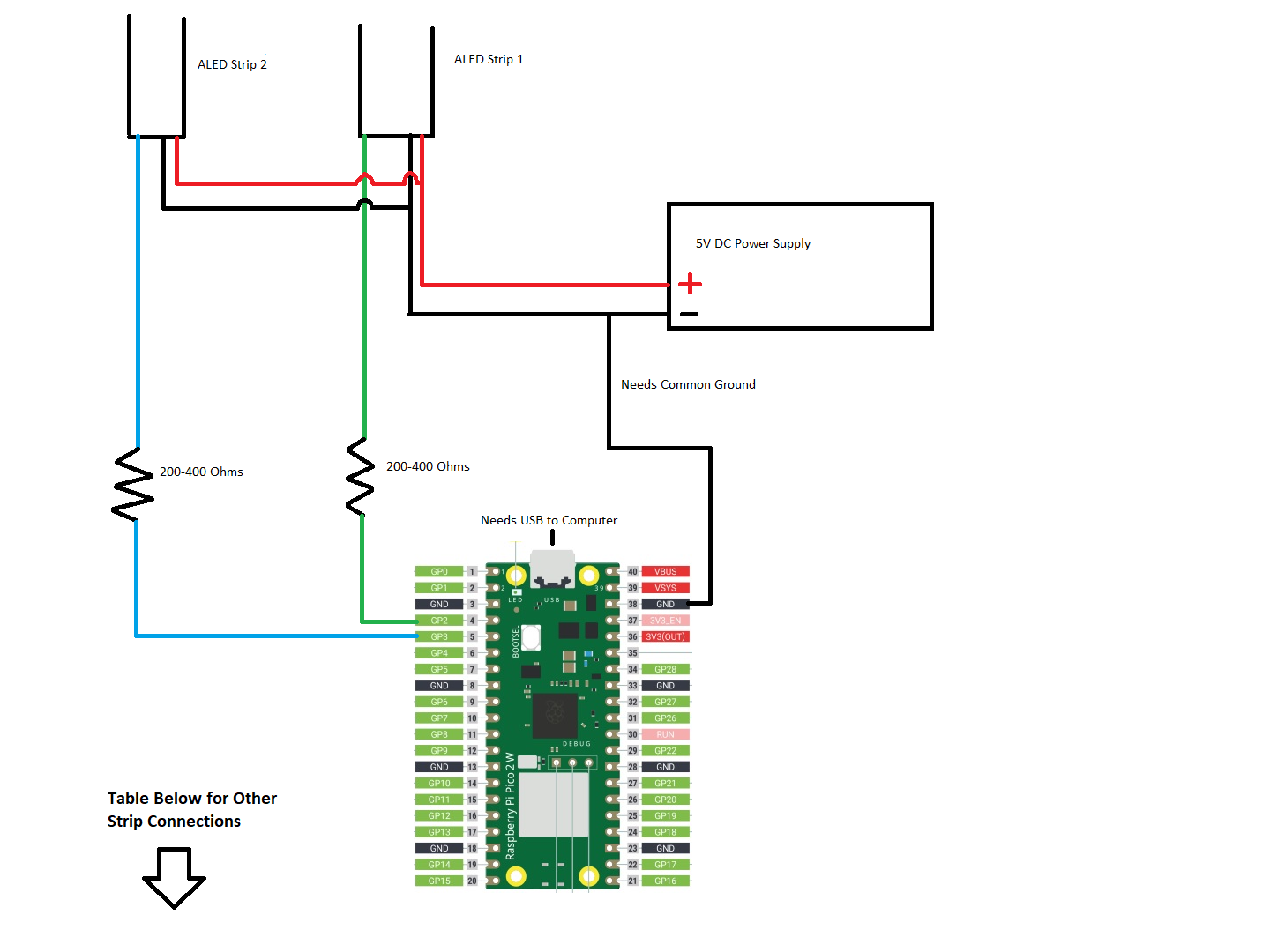
| ALED Strip | GPIO | RPi Pico 2(W) | Seeed Xiao RP2350 |
| 1st Strip | GPIO2 | Pin 4 | D8 |
| 2nd Strip | GPIO3 | Pin 5 | D10 |
| 3rd Strip | GPIO4 | Pin 6 | D9 |
| 4th Strip | GPIO5 | Pin 7 | D3 |
What about a level shifter? Looking at the WS2812B's datasheet and many other LED Controller's datasheets, the VIH is 0.7V. That means 0.7V or higher is high, or a logic 1. With the VIH set that low, a 1.8V micro-controller can drive the signal, but not recommended. At the 3.3V of the Pico 2(W), that is 2.6V (3.3V - 0.7V) of space. With the 200-400 Ohm resistor in series, it will bring the voltage down a little, but still like at ~2V of space.
So, what causes the flickering or bad LED coloring. Looking at the specs, I am guessing it is the VIL, which is 0.3V. Meaning 0.3V and lower, is a low, or a logic 0. The specs says, it hit hysteresis at 0.35V. Hysteresis means an unknown value, and can be a logic 0 or 1. That is a low ground floor and only 0.3V space. Also, a common ground is needed. Must likely, the ground voltage can spike the low pin voltage up to 0.35V or higher, and be recorded as high (logic 1), which starts the interface, and does at least 1 LED.
So if you are having flickering, LEDs on, and/or bad LED coloring, it is best to look at the ground, and remove ground noise. Also, any EMI that the wire travels by. User can try the pull down enabled firmware. This has the pull down enable on the data pins, which can help with signal integrity and writing low. Use good wire, and at least 24awg or smaller (bigger wire). If you are using 30awg with a long run, you are just asking for trouble. You could use a buffer, like the 74HCT125 or 74HCT245. But this is just covering up the problem, and as an engineer, the problem should be fixed, and not masked. But I know people would just use the buffer, as it is cheap and easy to do. Hence, why I am saying all this.
Link to the WS2812B Datasheet, from Adafruit, https://cdn-shop.adafruit.com/datasheets/WS2812B.pdf
Also, the interface is not running that fast. It's clock at 800KHz, which is a period of 1.25us. It is a single end data pin, that is a clock edge finder. Both logic 0 and 1, has a raising and failing edge. If no data is on the line, then it remains at logic 0. But if it was a differential signal, it would need the buffer at all, but would need 2 pins though, but I can see why it was designed it this way. Can see the timings in the datasheet.
Load Firmware onto the Pico 2(W)
First, the Pico 2(W) device must be in the ‘BOOT’ mode. If the device is brand new, with no firmware, it should automatically load to 'BOOT' mode, with a new USB drive showing up, labeled as RP2350. If the USB drive is showing up on the user computer, go to the next paragraph. If device has a different firmware loaded, powering down the device, by unplugging it. The press and hold ‘BOOTSEL’ or ‘BOOT’ button. Then plug in the device, powering back up. After a few seconds, you can release the button. Then a new USB drive will appear on your computer, labeled as RP2350. If this doesn't happen, follow the instructions again.
With the new USB drive open, drag and drop the UF2 file into the USB drive. It will then disappear and the Pico 2(W) will reset and boot up the new firmware. If the Pico 2(W) USB is connected, then you can start Hook of the Reaper, and it should see the Pico 2(W) as LED Hook: Strip. If it doesn’t, then power down the Pico 2(W) and power it back up. Then close and re-start Hook of the Reaper.
Once LED Hook: Strip firmware is on the Pico 2(W) device and added to Hook of the Reaper, Hook of the Reaper can reset the Pico 2(W) device into 'BOOT' mode. So that the firmware can be updated, without physically touching the Pico 2(W) device. This can be done in the 'Edit Light Controller' window. First, select the LED Hook: Strip controller that you want to update. There is an 'Update LHS' button. After being clicked, it will reset the Pico 2(W) device into 'BOOT' mode. The user will have 3 minutes to update the firmware, by dragging and dropping the new UF2 file into the USB drive labeled RP2350. If it takes more than 3 minutes, then Hook of the Reaper needs to be closed and re-started. Also, there is a 'Reset LHS' button, which can reset the Pico 2(W) device. It is best to load the LED Hook: Strip firmware onto the device, before installing it. Then the user can use Hook of the Reaper to update the firmware or reset it.
High COM Port Number
It is highly recommended to use a high COM port number, like COM20 or higher. Please change the COM port, before adding it to Hook of the Reaper. There are two reasons for this. The first, is drive makers use certain COM port numbers, usually COM1 to COM12. The second, is some emulators will use COM ports. For example, TeknoParrot with Time Crisis 5, uses COM4. Using a high COM port, will make sure you don’t have any problems with other software.
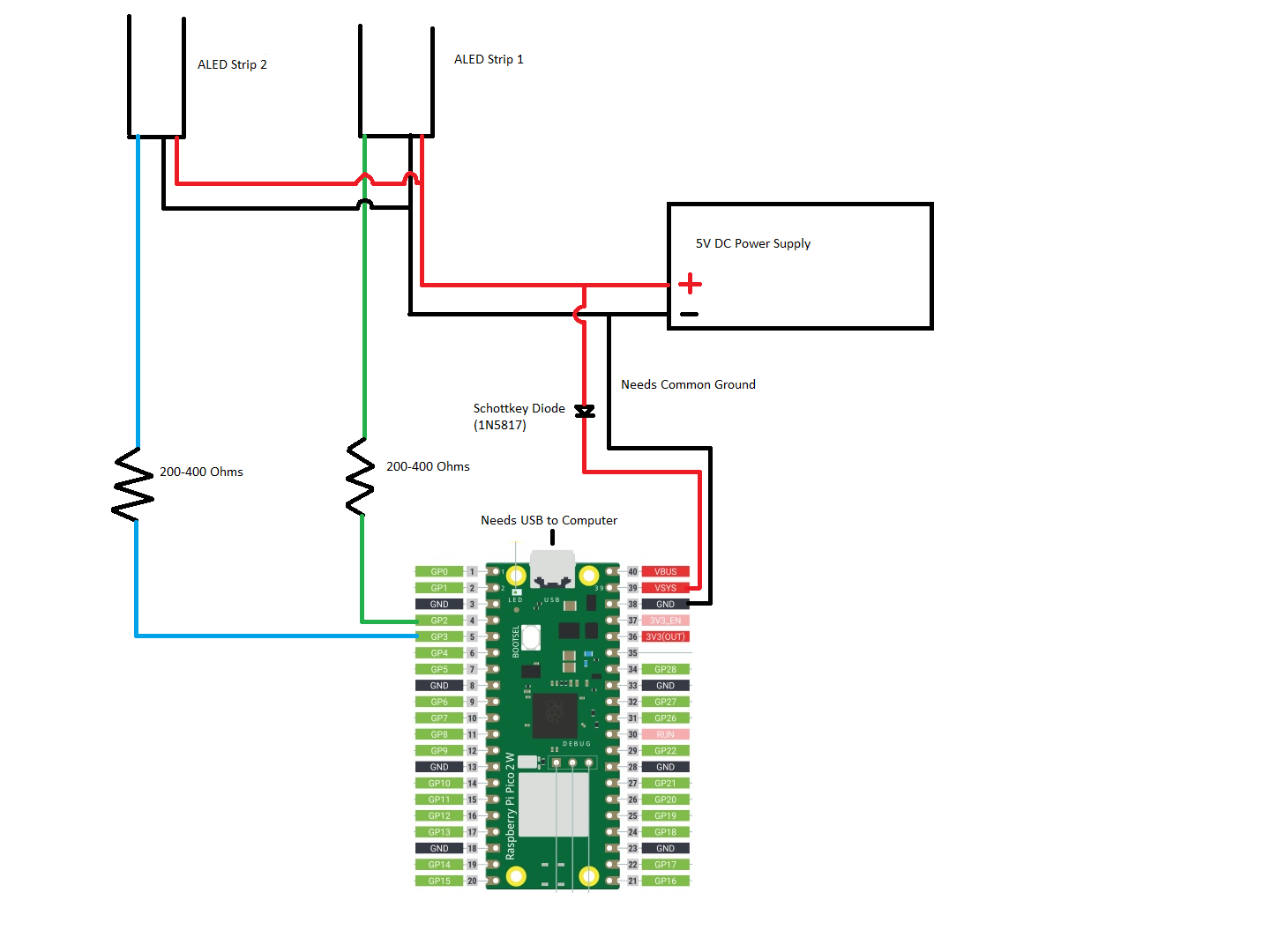
Connect Pico 2 to External Power Supply - Not Recommended, as Computer USB is Needed
If you want to use the 5V power supply to power the Pico 2(W) board. Here is a wiring diagram of it. A diode is needed on the power line, to make sure it doesn’t pull power from the USB power. If you get a USB wire that the 5V power is not connected, or cut the power wire on the USB cord, then the diode is not needed. As there is no USB power connection to pull from. The ground is still needed, as USB2 still uses single ended receivers sometimes. But mostly it uses the differential receiver, which doesn’t use ground. So it might be doable, without the USB ground.
What ALED Strips Are Supported?
Any ALED RGB strip using the single wire Non Return to Zero (NRZ) protocol at 800KHz will work. The most notable are WS2811, WS2812, WS2813, and WS2815. Also, ALED RGBW strip support was put in v0.4 and later. It fully uses the W LED, when the RGB allows it. For example, if R, G, and B values are all 128, then the code will make W 128 and R, G, and B 0. But the Group file still uses just the RGB, and the W value is never used. Notable ALED RGBW are WS2814.
Recommended for RGB
- WS2812B
- WS2812B-ECO
- WS2813
Works, But Not Recommended for RGB
- WS2811 (Has to be in Fast Mode 800KHz)
- WS2812
- WS2815
How Much Power Do I Need for the ALED?
This is a hard question to answer. In my videos about LED Hook: Strip, I used WS2812B with a 5050 SMD RGB LEDs. Looking at the datasheets, we know that the forward current (IF) for each diode is controlled to 20mA (0.02A). Since we know the voltage is 5V and the IF is 20mA, that makes the wattage for one color to 0.1W. With all 3 colors (RGB) on, that is 0.3W. But looking at real world test, the power is lower that. Here is a link that tested WS2812B 5050 ALED.
https://quinled.info/2020/03/12/digital-led-power-usage/
With 300 RGB LEDs at 100% white, it used 65W. That is 0.217W per LED, and 0.083W lower than the expected 0.3W. But if Red is turned on 100%, then it uses 25.54W, which is 0.0851W per LED. Then when Green is 100%, then it uses 25.50W, which is 0.0850W per LED. Then Blue at 100% is the same as Green. Add those 3 up (0.0851W + 0.0850W + 0.0850W) is 0.255W, which is 0.038W higher than the 100% white value at 0.217W. So each of the 3 LEDs, have 0.0128W more, when it is just that LED on.
Lets look at how much current is being used per LED. Each of the colors should be using 20mA, or a total of 60mA when white. At white, it was 65W, and we divide that by 5V, which gives us 13A. Then divided that by 300 LEDs, that is 43.33mA, which is 16.67mA less than the 60mA. Then divided 43.33mA by 3, which is 14.44mA, which is 5.56mA less then the 20mA. Lets do the same for just red, blue, and green. Red is 17.03mA per LED. Green and Blue is 17mA per LED.
When it is just one color, the current is 17mA. When all 3 colors are used, the current is 43.33mA, which is 14.44mA per color. So the current is not stable at 20mA. I wished they tested the combinations of 2 colors. That might tell me more.
Looking at this datasheet.
https://www.tweaking4all.com/wp-content/uploads/2014/01/5050LED.pdf
When the red LED IF is 20mA, the forward voltage (VF) is 2.0V. When the blue and green IF is 20mA, the VF is 3.18V. Now when the IF is 17mA, the RGB VF is 1.92V, 3.12V, and 3.12V. Again with IF at 14.44mA, the RGB VF is 1.89V, 3.08V, and 3.08V. What I think might be happening is that the red and green, or red and blue are being used together. If you add their VF together, it makes 4.97V drop, leaving only 30mV left. So they could be using the red & green or red & blue together, it could drop the power usage in half, so 0.1W instead of 0.2W. Or if they have 2 red LEDs, then they could be used together, and then have 2 branches at IF, instead of 3. Then each pair would be 0.1W, totaling 0.2W, which is being seen for white. Hence, why I would love to see the test with 2 colors. Another options, is if only 1 color LED is used, it uses the 17mA for IF, instead of the 20mA. Then if white is used, it uses 14.44mA for IF, instead of the 20mA. This will lower the power usage.
In the end, worst case was 0.217W, versus the 0.3W expected. Calculate the power used, with the calculation below.
Wattage = Number of LEDs X 0.217W (or 0.3W)
Amperage = Wattage / 5V
Then you never want to use 100% of your power supply. The maximum that you want to use is 80%. Lets say I have a strip of 144 LEDs. That makes a wattage of 31.25W and amperage of 6.25A. To get the 80%, divide the wattage and amperage by 0.8. That gives me 39.07W and 7.81A. So the best would be a 5V 8A (40W) power supply. Or you could be safe and use the 0.3W, instead of the 0.217W. That would give me 43.2W and 8.64A. The 80% PS would be 54W and 10.8A So the best would be a 5V 12A (60W) power supply.
If you didn’t use the 5050 SMD RGB LED, then you need to find the power usage, when it is white. That is when red, blue, and green is on at 100% intensity. Also, LED Hook: Strip doesn’t use the W, in the RGBW LED. It would just use the RGB. Like I said, it is a hard question to answer.
USB Power
Usually the computer’s USB-A can drive 900mA (0.9A). Sometimes there will be a USB-A charging plug, usually at 2A, but might not have data lines. The computer’s USB-C port can drive 3A. The computer’s USB ports are over-current protect by a programmable fuse. The fuse is self-healing, and the computer needs a reset for the USB plug to come back on-line. Sometimes a cold reset is needed. Also, the computer's 5V PSU can drive a lot of current. The 80% power supply rule doesn't apply. But should use ~5% to be safe.
Also, there are powered USB hubs. These are usually harder to figure out. As they don’t usually post how much current can be driven per port.
The Pico 2(W) will use around 20mA of current at 5V. Worst case is 40mA at 5V. So plan around 30mA of the 5V power for the Pico 2(W), if using the USB power.
Source Code
Right now, the GitHub is private. Once the bugs have been cleared out, I will make the GitHub public again. As all my pre-production code will now be private.
Releases